
Testing International Phone Numbers
By default, CheckView uses a U.S. phone number format for test flows. However, for those who require international phone number formats (e.g., +44 for the UK), options are available based on your plan to accommodate various formats that are enforced by your form logic.
For example in Gravity Forms, you can set either US or International Format:
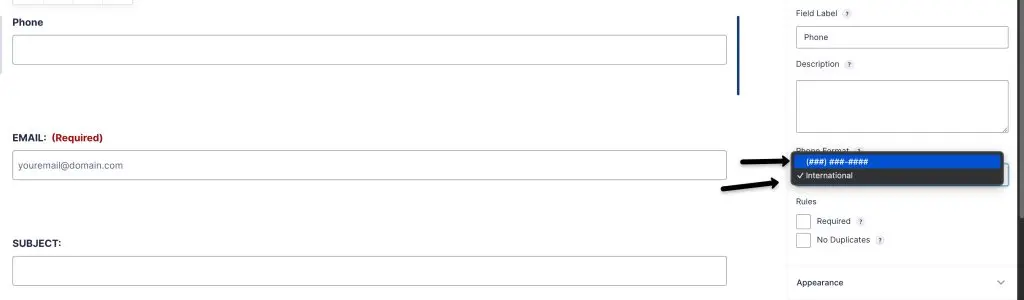
Default U.S. Format
CheckView’s standard phone number format follows U.S. conventions (e.g., (123) 456-7890). This is automatically applied in test flows unless adjusted for an international format.
For Higher-End Plans: Changing Phone Number Format in Organization Settings
On CheckView Advanced plans, you can modify the default phone number format for all tests within your organization to support international formats. This can be done in the Variables section of your organization settings.
- Navigate to Organization Settings: Go to Settings > Variables within your CheckView dashboard.
- Update the Phone Number Value: Specify the desired international phone number value with only numbers.
- Save Changes: Your organization’s test flows will now use the updated phone number format across all new test flows.
For Lower-End Plans: Adjusting Phone Number Format on a Per Test Flow Basis
For plans without organization variables, international phone numbers must be set up individually within each test flow.
- Open the Test Flow: Go to the test flow in CheckView where you need to use an international phone number format.
- Modify the Phone Number Test Step: In the test steps, locate the field associated with the phone number. Update this step with an international phone number value that follows the desired format (e.g., +441234567890).
- Save and Continue: After adjusting the phone number format, save the test flow to ensure the correct format is applied for that test.
Automatic handling of international phone fields
For phone fields that use the international telephone input (the field with a country flag dropdown), CheckView enters the number with a dial code prefix so the field accepts it, instead of opening the country dropdown. This is applied when a test flow is generated, so newly generated or rebuilt flows use it automatically. Existing flows are unchanged until you rebuild them. The default dial code is +1, so to test a specific country format you can still set the value using the Variables method described above.
Phone validation is one of the field types that quietly breaks after a plugin update. Automated WordPress testing fills and submits these fields on every run, so a rejected format is caught before a customer hits it.