
REST API — Getting Started
The CheckView REST API gives you programmatic access to manage websites, test flows, test runs, UX audits, teams, and notifications. Use it to integrate CheckView into your CI/CD pipelines, build custom dashboards, or automate your testing workflows.
The API includes 101 public endpoints across 11 resource groups. Infrastructure endpoints for health monitoring (/health, /health/ready, /health/live) are also available but are not covered in the endpoint reference.
Base URL
All API requests use this base URL:
https://api.checkview.io/api/v1Example request (shown as a raw HTTP request):
GET /api/v1/websites HTTP/1.1
Host: api.checkview.io
Authorization: Bearer cvpat_your_token_here
Authentication
The API uses Personal Access Tokens (PATs) for authentication. All tokens use the cvpat_ prefix.
Create a Personal Access Token
- Go to Settings → API Tokens in the CheckView dashboard. Only organization admins can create tokens.
- Click Create Token and enter a name.
- Copy the token immediately – it is only shown once and cannot be retrieved later.
- Store it securely (e.g., in your CI/CD secrets or a password manager).
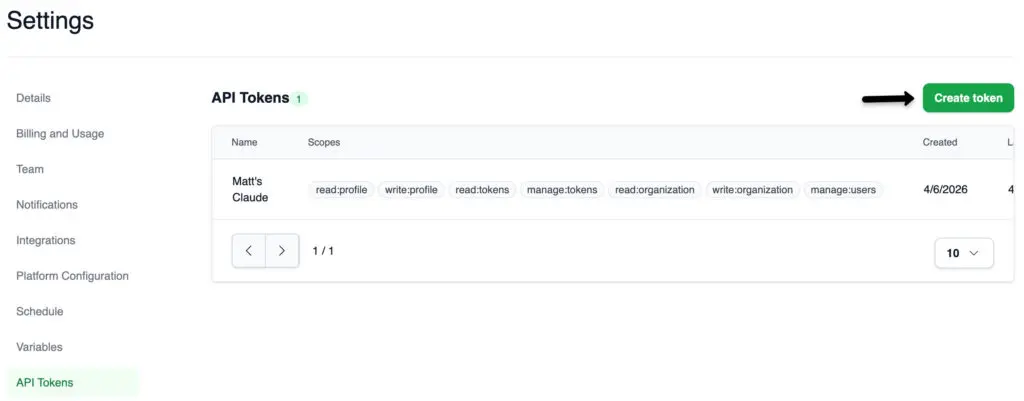 Tokens created from the dashboard receive your full user permissions automatically. If you need restricted scopes, you can create tokens with specific scopes via the API directly.
Using a Token
Include the token in the Authorization header of every request:
Authorization: Bearer cvpat_your_token_hereAvailable Scopes
Tokens can be scoped to limit access:
- read:profile, write:profile – View and update your user profile
- read:organization, write:organization – View and manage organization resources (websites, test flows, test runs, audits)
- read:tokens, manage:tokens – View and manage API tokens
- manage:users – Manage team members and invitations (admin role required)
Rate Limits
API requests are rate-limited per organization:
| Plan | Requests per Minute |
|---|---|
| Any paid plan | 60 |
| No active subscription | 10 |
The 60 req/min limit is generous enough for typical usage including MCP sessions, CI/CD pipelines, and dashboard integrations. We may raise limits in the future as we monitor real-world usage patterns. If you have a use case that genuinely requires higher throughput, contact support.
Every authenticated response includes rate limit headers:
- X-RateLimit-Limit – Maximum requests allowed per minute
- X-RateLimit-Remaining – Requests remaining in the current window
- X-RateLimit-Reset – Unix timestamp when the window resets
- Retry-After – Seconds to wait (only on 429 Too Many Requests)
Idempotency
Write operations (POST, PATCH, DELETE) support idempotency to prevent duplicate actions. Include an Idempotency-Key header with a unique value (e.g., a UUID) on any write request. If you send the same key within 60 minutes, the API returns the cached response instead of executing the operation again.
Idempotency-Key: 550e8400-e29b-41d4-a716-446655440000Pagination
List endpoints return paginated results using cursor-based pagination. Response headers include:
- X-Next-Cursor – Pass this value as the cursor query parameter to fetch the next page
- X-Has-More – true if more results exist beyond the current page
- X-Total-Count – Total number of results (when available)
Use the limit parameter to control page size (default: 20).
Error Handling
Errors follow the RFC 7807 Problem Details format:
{
  "type": "https://api.checkview.io/errors/not-found",
  "title": "Not Found",
  "status": 404,
  "detail": "The requested test flow does not exist.",
  "instance": "/api/v1/test-flows/abc-123"
}
Common status codes: 200 (success), 201 (created), 204 (no content), 400 (bad request), 401 (unauthorized), 403 (forbidden), 404 (not found), 429 (rate limit exceeded).
If a request fails, these are the three you are most likely to see:
- 401 Unauthorized – your token has expired or been revoked. Generate a new one at Settings → API Tokens (organization admins only).
- 403 Forbidden – your token does not carry the scope that endpoint requires. Create a new token with the scopes you need.
- 429 Too Many Requests – you have exceeded the rate limit. Wait the number of seconds given in the
Retry-Afterheader, then retry.
For every status code, validation rule, and when it is safe to retry with the same idempotency key, see REST API Errors and Retries.
Interactive API Docs
Prefer to explore the API interactively? The full OpenAPI spec is available via Swagger UI:
- Swagger UI: https://api.checkview.io/docs – browse and try endpoints in the browser
- OpenAPI spec (JSON): https://api.checkview.io/docs-json – import into Postman, Insomnia, or code generators
Endpoint Reference
The full endpoint reference is organized across three pages:
- Core Resources – Websites, Test Flows, and Test Runs (75 endpoints)
- Organization & Access – Organizations, Team, Users, and Tokens (12 endpoints)
- Audits, Settings & Utilities – UX Audits, Reference Data, Settings, and Test Flow Types
Related Articles
- Pricing and Subscriptions – Subscription plans and feature access
- Security – Token security and data protection
- Teams and Delegated Access – API token scopes map to team roles
The API is one way to drive CheckView. For everything available in the app itself, see the feature set.