
Blocker Detection
Updated: CheckView’s blocker detection was tightened so a site is flagged as blocking only when a real firewall or security block page is detected, not simply because a security or performance plugin is installed. False “blocked” results from plugins such as Perfmatters and Wordfence are now far less common, and the Perfmatters check was removed entirely. If you still see a blocked result, your firewall or security plugin may be genuinely blocking CheckView, so whitelist its IP addresses.
CheckView automatically detects when security plugins, firewalls, or bot protection services are blocking test execution. Instead of a cryptic failure, you’ll see a clear error message identifying the blocker and how to resolve it.
When Detection Runs
Blocker detection runs automatically during:
- Website addition – when connecting a new site to CheckView
- Test flow creation – when fetching forms and pages from your site
- Test setup – during the initial setup and step generation process
- Test execution – when a test run encounters a blocked response
What You’ll See
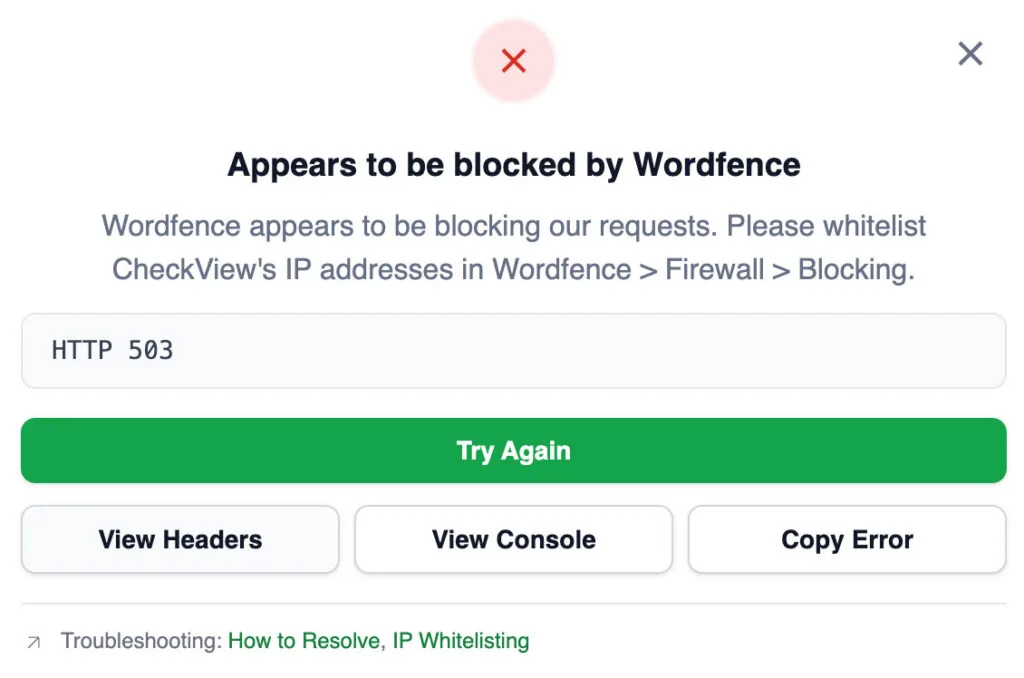
When a blocker is detected, a red error card appears on the test results or setup error page with:
- The name of the detected blocker (e.g., “Appears to be blocked by Cloudflare”)
- A “How to Resolve” link to the specific whitelisting documentation for that service
- A link to CheckView’s public IP addresses for manual whitelisting
What Gets Detected
CheckView detects 13 security and firewall services:
- Wordfence
- Cloudflare
- Sucuri
- PatchStack
- All In One WP Security (AIOS)
- SolidWP Security
- Defender Pro
- ModSecurity
- Imunify360
- LiteSpeed
- BitNinja
- ConfigServer Firewall (CSF)
- CHEQ
CheckView also detects two non-security issues that prevent testing:
- REST API Disabled – the WordPress REST API is not accessible
- Plugin Not Active – the CheckView WordPress plugin is not installed or activated
How to Resolve
The resolution depends on which service is blocking CheckView. For the following services, we have dedicated step-by-step guides:
- Cloudflare
- Wordfence
- PatchStack
- Perfmatters
- All In One WP Security (AIOS)
- SolidWP Security
- Defender Pro
For all other blockers (Sucuri, ModSecurity, Imunify360, LiteSpeed, BitNinja, ConfigServer Firewall, CHEQ), you’ll need to whitelist CheckView’s IP addresses in your hosting or security service’s control panel. See Whitelisting CheckView IPs and Bypassing Security Plugin Blocks for general guidance.
You can also use the CheckView IP addresses page to get the current list of IPs to whitelist, including a Cloudflare-compatible CSV download.
Additional Whitelisting Guides
These services have their own whitelisting documentation, though they are not auto-detected by blocker detection: